Tutorials / Connectivity
MQTT: readings to the cloud and back
Publish a potentiometer reading to a public broker on the internet every three seconds, subscribe to the same topic, and blink an LED when the message comes back.
- LED
- Potentiometer
- Wi-Fi router
What it is
MQTT is the messaging protocol of small connected devices. A device does not talk to another device: it publishes messages on a topic (stannum/room01/sensor) to a broker, a server that forwards them to everyone subscribed to that topic. Tiny messages, one connection kept open, and no web server to write — it is how sensors reach dashboards and phones.
In the simulator
The circuit is the Wi-Fi one plus a potentiometer: the router block gives the ESP32 a network, and through it the real internet. The sketch connects to broker.hivemq.com, a public broker anyone can use, so the bytes really leave the simulation and come back.
Wiring
The circuit below is the example MQTT: send readings to the cloud from the lab — open it with Project → Open example… and it comes ready to run.
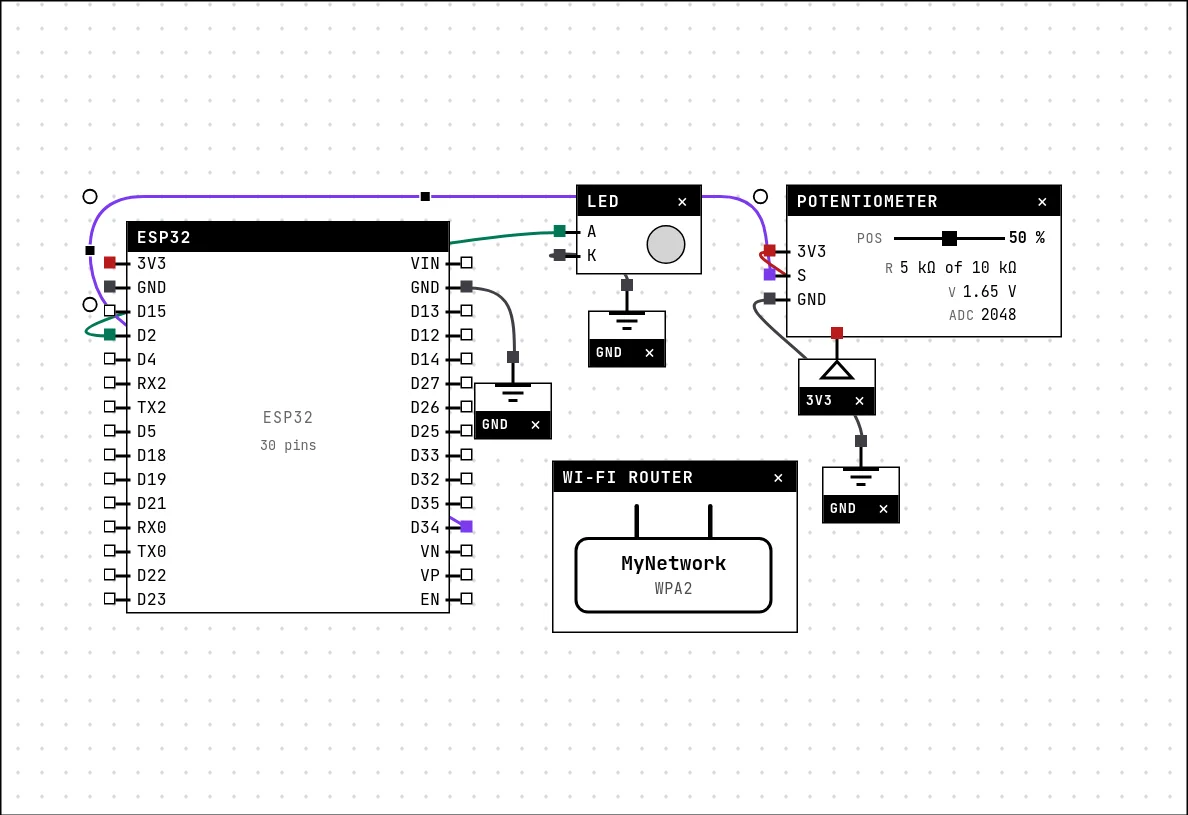
| Part | Pin | Goes to |
|---|---|---|
| LED | A | D2 on the board (GPIO 2) |
| LED | K | a GND symbol |
| Potentiometer | 3V3 | a 3V3 symbol |
| Potentiometer | S | D34 on the board (GPIO 34) |
| Potentiometer | GND | a GND symbol |
Code
The PubSubClient library is the usual MQTT client for Arduino. Three things every MQTT project has to get right are in the comments of the sketch: the client name must be unique on the broker, mqtt.loop() must be called all the time, and a public topic is public.
#include <Arduino.h>
#include <WiFi.h>
#include <PubSubClient.h>

// CHANGE this to a name of your own. This broker is PUBLIC: anyone in the
// world reads what you publish here, and you read what they publish.
const char *BASE = "stannum/room01";

WiFiClient rede;          // the TCP socket
PubSubClient mqtt(rede);  // the MQTT protocol on top of it

// The client name has to be UNIQUE on the broker: two clients with the same
// name knock each other out in an endless loop. With a whole class running
// this same example that is a given, so we draw a suffix at startup.
String nomeCliente = "stannum-" + String(esp_random(), HEX);

const int LED = 2;
const int POT = 34;
int idas = 0;

// Called when a message ARRIVES from a subscribed topic.
void aoChegar(char *topico, byte *carga, unsigned int tam) {
  String msg;
  for (unsigned int i = 0; i < tam; i++) msg += (char)carga[i];
  idas++;
  digitalWrite(LED, idas % 2);       // blinks on every round trip
  Serial.printf("<- came from the broker [%s] %s\n", topico, msg.c_str());
}

void conectarBroker() {
  while (!mqtt.connected()) {
    Serial.print("connecting to the broker as " + nomeCliente + "... ");
    if (mqtt.connect(nomeCliente.c_str())) {
      Serial.println("ok");
      mqtt.subscribe((String(BASE) + "/sensor").c_str());
    } else {
      // negative rc = it never even spoke MQTT (network/DNS); positive = the
      // broker refused it (duplicate name, version, authentication)
      Serial.printf("failed rc=%d, trying again in 3 s\n", mqtt.state());
      delay(3000);
    }
  }
}

void setup() {
  Serial.begin(115200);
  pinMode(LED, OUTPUT);

  WiFi.begin("MyNetwork", "secret123");
  while (WiFi.status() != WL_CONNECTED) delay(200);
  Serial.print("IP: ");
  Serial.println(WiFi.localIP());

  mqtt.setServer("broker.hivemq.com", 1883);
  mqtt.setCallback(aoChegar);
}

unsigned long ultimo = 0;

void loop() {
  conectarBroker();
  mqtt.loop();          // WITHOUT THIS nothing arrives: here the lib reads the socket

  if (millis() - ultimo > 3000) {
    ultimo = millis();
    char valor[12];
    snprintf(valor, sizeof(valor), "%d", analogRead(POT));
    mqtt.publish((String(BASE) + "/sensor").c_str(), valor);
    Serial.printf("-> published %s\n", valor);
  }
  delay(20);
}setServer names the broker and the port; setCallback registers the function that runs when a message arrives; subscribe asks for the topic. In the loop, every three seconds the potentiometer's reading is published — and since the sketch is subscribed to its own topic, the broker sends it right back. The round trip toggles the LED.
Run it
Press Build and run. The first build of a project takes a while; after that, only what changed is rebuilt.
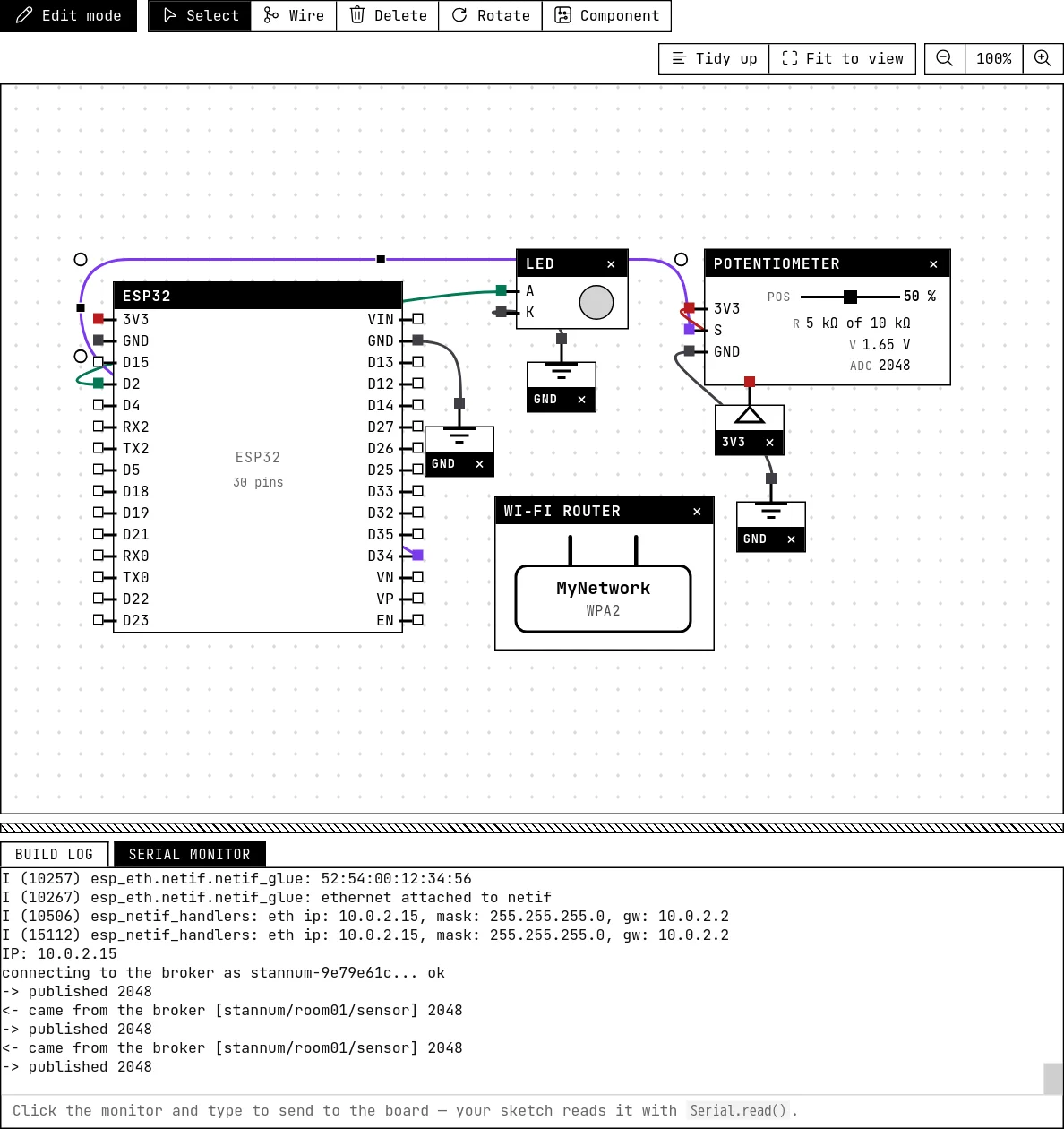
The serial monitor shows the IP address, “connecting to the broker as stannum-… ok”, then pairs of lines: “-> published 2048” and “<- came from the broker [stannum/room01/sensor] 2048”. The LED toggles on every round trip. Drag the potentiometer and the number changes.
How the simulation models it
- The network is the real one: the broker's name is resolved, the connection goes out through the server's internet access, and the broker is the same public one a physical board would use. The library's code runs unchanged.
- Because the broker is public, change
BASEto a name of your own: another class running this example on the same topic sees your readings, and you theirs. Two clients with the same name knock each other off the broker — that is what the random suffix in the client name avoids. - Without a router block, or with the wrong name or password, the sketch waits in
WiFi.begin()forever; the router guide shows what the serial monitor says in each case.
Try this
- Open a web MQTT client (HiveMQ has one on its site) and subscribe to your topic: the readings appear there as the sketch publishes them.
- From that client, publish “on” or “off” to a second topic and make the sketch drive the LED from it — the other direction.
- Change
BASEto a name of your own and publish a JSON string with two readings instead of a bare number.
See also
- Wi-Fi and the router — The ESP32 only connects if there is a router block with the right name and password — and then it reaches the real internet.
- Potentiometer — A variable resistor whose wiper divides 3.3 V — the first analog input, read with analogRead().
- LED — The first output of every project: a GPIO set HIGH lights it, LOW turns it off.